
Introduction — a quick field lesson
Clear communication between the field and the design office saves time, money, and frustration. As a senior engineer who has reviewed hundreds of RFIs and site diaries, I can tell you that concise, well-documented questions and factual daily reports get faster answers and avoid disputes. This article shows simple, practical steps you can use on day one in the field.
Key takeaways
- An RFI (Request for Information) is the formal way to ask the design team for clarification when contract documents are incomplete or ambiguous.
- Daily site diaries are a primary contemporaneous record for later claims or disputes. Keep them factual, time-stamped, and photo-backed.
- Use a short RFI checklist every time: precise question, exact drawing reference, blocked work explanation, suggested options, and attachments.
- Two photos per RFI — one context, one close-up — and an annotated image cut down review time dramatically.
- Track RFIs in a simple log and escalate politely when responses are overdue.
When to write an RFI vs when to use a site note or quick call
Deciding whether to issue an RFI or make a quick call is an important early judgment. Here are field-friendly rules of thumb:
- Issue an RFI when there is a contract or design ambiguity that prevents work from progressing. An RFI is the formal mechanism to get a recorded decision from the design team.
- Use a site note or phone call for minor, operational clarifications that do not change contract scope—for example, confirming temporary access or a short-term sequence change. Always record the outcome of calls in the daily diary with names and photos.
What is an RFI?
An RFI (Request for Information) is a formal written request used during construction to ask the design team for clarification. Using a consistent template speeds review and response and creates a clear record of what was asked and answered.
The one-page RFI checklist (what to include every time)
A short, structured RFI reduces back-and-forth. Before you issue an RFI, run through this checklist:
- Header: RFI number, date, project location. Include drawing number and sheet reference so the reviewer can find the detail immediately.
- Question: One-sentence, scoped question. Avoid long narrative — ask exactly what you need decided.
- Why it matters: State what work is blocked and the schedule or safety impact if the RFI is not answered.
- Attachments: Include photos (context and close-up), an annotated photo or sketch, and any supporting spec or drawing extracts.
- Suggested options: If you can, offer 1–2 practical options and your recommended decision. This helps the reviewer respond quickly.
- Who and when: State who raised the RFI, who must respond, and a desired response date or priority level.
Why this works: reviewers can find the referenced drawing, see the problem in photos, and immediately understand schedule impact and suggested fixes. This reduces delay and repeated questions — a key point industry guidance highlights about RFI control.
Daily site report (site diary) essentials for junior engineers
Daily reports are often the most important contemporaneous record. Make entries factual and time-stamped. Include these items each shift:
- Weather and site conditions (brief).
- Workforce: trades on site and approximate numbers where relevant.
- Plant and major equipment present.
- Deliveries received and material condition.
- Inspections and tests performed and their outcomes.
- Instructions issued on site (who gave them and to whom).
- Any safety incidents or near misses.
- Deviations from drawings or scope and who witnessed them.
- Photos with captions and who took them.
Write entries promptly each day. Identify witnesses or trade supervisors and include contact names if available. Fact-based diaries with photo evidence reduce risk and help protect the project if questions arise later.
Photos and sketches: two small rules that save hours
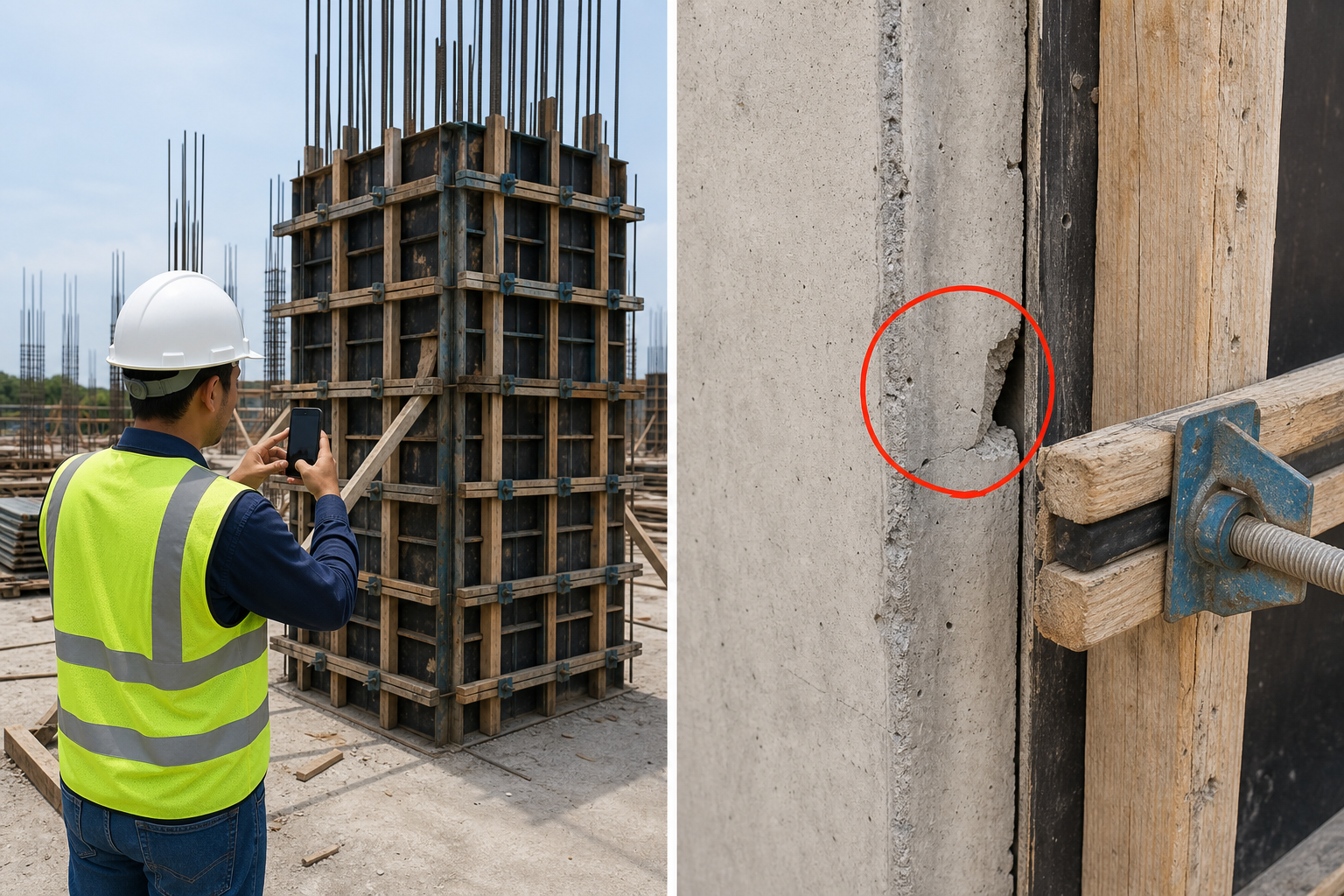
Every RFI should include at least two pictures: one wide context shot and one close-up. Annotate one image (draw a simple arrow or circle by hand and attach the scanned/photographed annotation). Annotated photos convert vague descriptions into precise visual questions.
Common mistakes junior engineers make (and quick fixes)
- Vague RFI questions — fix: add exact drawing references and attach annotated photos so the reviewer knows exactly where to look.
- Multiple RFIs for the same issue — fix: consolidate related questions into one RFI and number sub-questions if needed.
- Delaying diary entries — fix: write them daily; a short factual entry is better than a late, memory-based narrative.
- Not tracking responses — fix: maintain a simple RFI log (spreadsheet or the project’s RFI tool) with status and next action; escalate politely when overdue.
Practical workflow tips and tools (low-effort wins)
- Use a single RFI template across your team. Keep it short and consistent so reviewers know where to find each piece of information.
- Number RFIs with a simple convention: project code / discipline / sequential number. Consistent numbering helps tracking.
- Attach at least two photos per RFI: context and close-up; annotate one. Good photos reduce clarifying questions.
- Use a shared spreadsheet or the project’s document-management RFI tool to track status, deadlines, and who is responsible for each action.
- How to escalate: send a polite reminder to the responder, and if there is still no reply within your project’s agreed time, copy the project manager and contract administrator to keep visible control.
Short annotated examples
Example RFI (tight and clear)
Header: RFI-001, Date: [today], Drawing: Arch-12, Sheet A3.2, Location: North stair landing.
Question (one sentence): The handrail height on Arch-12 Detail B reads 1.0 m but the structural guardrail layout conflicts at gridline 4; please confirm the required handrail top level at gridline 4.
Why it matters: Installation cannot proceed on this landing until the level is confirmed; work currently blocked and scaffold extended.
Attachments: context photo, close-up photo with arrow to conflict, excerpt of Arch-12 Detail B.
Suggested options: (1) accept guardrail layout at structural coordinate, or (2) revise structural post heights by 50 mm. Recommended: option 1 if architect confirms will meet code. Respond by: project standard response time. Raised by: [Name].
Example diary entry (good vs poor)
Poor entry: “Found wall different to drawing. Contractor told me. Took photo.”
Improved entry: “08:45 – Observed wall at gridline 3A built 30 mm out of plumb compared to Arch-05. Witness: Site foreman Ahmed (trade). Photo 1 (context) and Photo 2 (close-up) attached. Notified contractor and raised RFI-001 to confirm as-built acceptance. No safety impact. Weather: dry. Entry by: [Your name].”
Closing advice — habits that make you look professional
- Be timely: issue RFIs as soon as you identify a contract ambiguity.
- Be factual and concise: avoid opinions in diaries and RFIs — state what you see, when, and who witnessed it.
- Attach good photos and a short annotated sketch when needed.
- Create a short personal checklist to run through before issuing an RFI or signing a diary.
- Offer to discuss complex RFIs with the design engineer — a short call can speed the formal response and reduce back-and-forth.
Conclusion
Good RFIs and daily site reports are simple habits that separate junior engineers who struggle from those who move projects forward. Use a short RFI checklist, keep diary entries factual and time-stamped, attach clear photos, and track responses. These small efforts lead to faster decisions, fewer reworks, and defensible records if issues escalate.
Educational disclaimer
This article is intended for educational purposes and to share practical field-office communication tips. It does not replace project-specific contract requirements or formal legal advice.
Sources
- Autodesk Construction — The in-and-outs of construction RFIs (guide & templates)
- Procore — Your essential guide to construction site diaries (daily reports)
- CMAA — IMPACT & CONTROL OF RFIs ON CONSTRUCTION PROJECTS (industry guidance)
- Arcadis — Global Construction Disputes Report (documentation and disputes)
- Autodesk Construction — RFI template checklist (practical tips)