
Introduction
Generative AI is moving from research labs into the mainstream of BIM software and construction workflows. Between 2024 and mid‑2026 vendors and startups released AI-enabled features and platforms that assist with model interrogation, clash triage, documentation drafting and basic quantity checks. For junior engineers, these tools promise to speed repetitive tasks and improve coordination — but they also require careful data hygiene, validation and governance.
Key takeaways
- Generative AI is now appearing inside mainstream BIM tools (for example, a tech preview of a conversational assistant in Revit was announced in April 2026).
- Start small: pick one narrow use-case (clash triage, drawing cleanup or a 4D sequencing check) and run a non‑production pilot under senior supervision.
- Prepare model hygiene (consistent naming, federated models and metadata) before using AI — garbage in, garbage out still applies.
- Always validate AI outputs with a qualified engineer; document who reviewed what and keep a record of data sources and decisions.
- Watch for privacy and contractual restrictions before sending models to third‑party or cloud services.
1. Why this matters to junior engineers
Junior engineers spend a lot of time on high-volume, repetitive BIM tasks: running clash checks, sorting coordination issues, preparing markups and compiling takeoffs. Generative AI and agentic assistants can automate parts of these workflows — for example triaging clashes, drafting revision summaries, or suggesting sequencing flags — freeing time for higher-value engineering work. Starting to use these tools responsibly today helps you build practical skills, influence office workflows and avoid being left behind as firms adopt AI‑augmented processes.
2. Quick summary of recent developments (2024–June 2026)
Key industry movement in this period includes:
- Vendor integrations: major BIM vendors began publishing AI features and tech previews. Notably, Autodesk announced an “Autodesk Assistant” conversational assistant integrated into Revit as a tech preview in April 2026.
- Commercial platforms: startups and established vendors launched AI‑enabled BIM and VDC platforms to accelerate routing, coordination and design iterations during 2025–2026.
- Industry appetite: surveys during 2025–2026 show construction firms placing generative AI and BIM among top technology priorities, focused on automating repetitive tasks and improving coordination.
- Research and limits: peer‑reviewed work and reviews through early 2026 highlight growing AI applications across the BIM lifecycle, while noting current constraints — model/data standards gaps, physics/constructability limits and the need for human oversight.
3. High‑value, low‑risk use cases junior engineers can try
Choose tasks with clear human review steps and limited regulatory exposure. Good early use cases include:
Automated clash triage
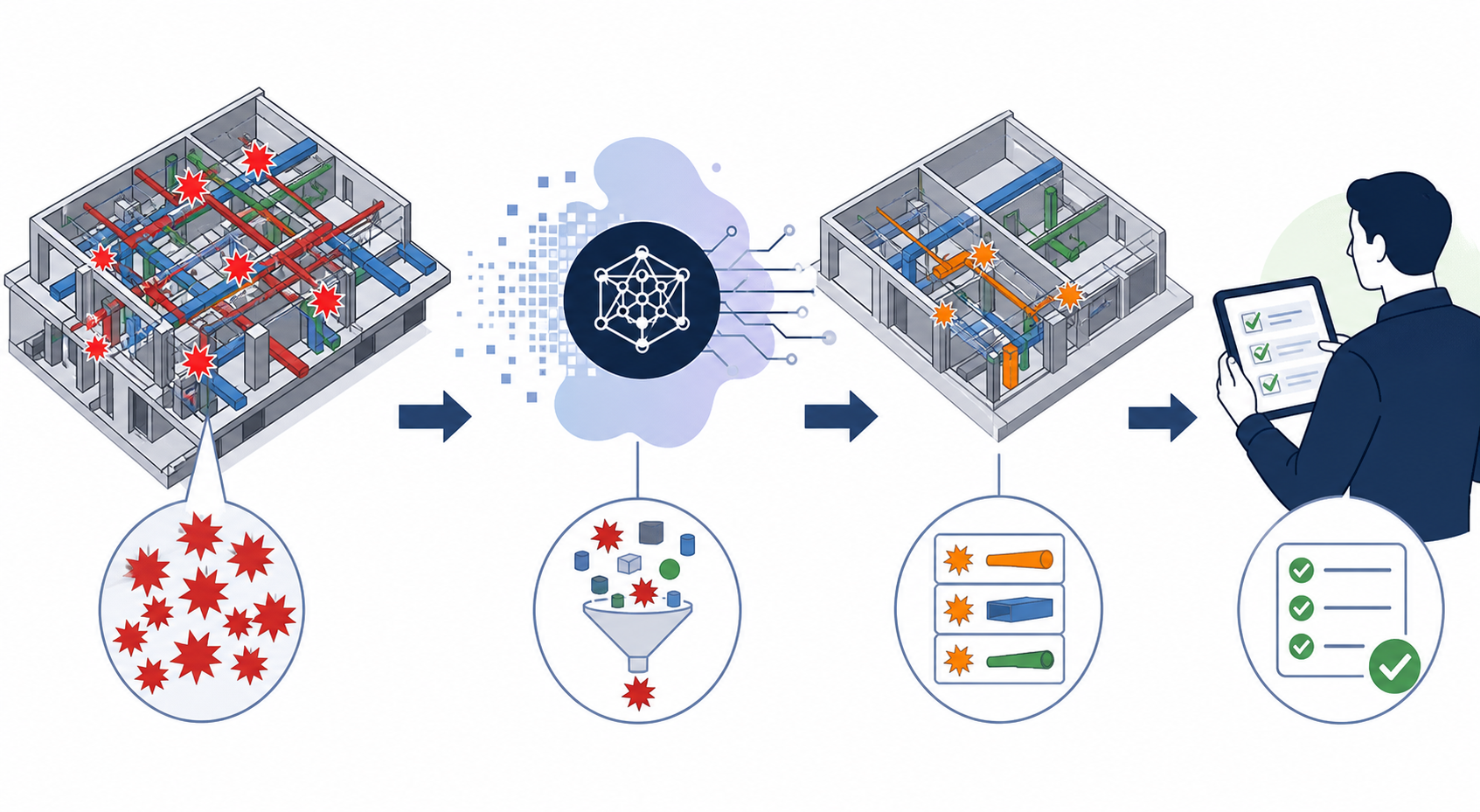
Let AI prioritise clashes, group related issues, and flag likely false positives for human review. Use AI to produce a short, ranked list of actionable clashes for a senior engineer to validate, rather than auto‑resolving model geometry.
Drawing and documentation cleanup
AI can draft annotation text, generate revision summaries and create checklists for submittals. Treat generated text as a first draft: edit and confirm before issuing documents.
4D sequence checks and access alerts
For 4D models, AI can surface likely access conflicts in specific sequences (e.g., crane zones vs. finishing trades) and suggest areas to investigate during site coordination meetings.
Basic quantity checks and BOQ assistance
Use AI to run rough takeoffs or summarise quantities from model elements. Always cross‑check quantities and assumptions before sharing for procurement or contractual uses.
Risk‑flagging and QA
AI can detect missing metadata, inconsistent naming conventions, or elements outside expected parameter ranges and produce a short QA checklist for the model owner.
4. A practical 6‑step pilot plan (run this in a single week or sprint)
This roadmap helps you run a low‑risk pilot on a real project while keeping senior oversight and governance in place.
Step 1 — Pick one narrow use‑case
Select a single, well‑scoped task. Example: clash triage on one MEP‑heavy floor/level of a building. Narrow scope keeps the pilot manageable and measurable.
Step 2 — Prepare the data
Before using any AI tool, tidy the model set:
- Federate models so architectural, structural and MEP models are available for cross‑checking.
- Enforce consistent naming for levels, systems and key families.
- Ensure required metadata (system names, service types, level assignments) are present for elements you want the AI to interpret.
Step 3 — Choose a tool and environment
Prefer vendor‑integrated previews (for example Revit Assistant tech previews) or well‑known AEC platforms that connect directly to your BIM environment. Avoid uploading restricted or proprietary models to unvetted public services; check company IT and legal guidance and vendor terms before use.
Step 4 — Run the AI workflow in a sandbox
Execute the pilot in a non‑production environment. Request the AI to produce a triage list, a short justification for each priority, and suggested next actions. Save all outputs and keep the original models unchanged until a senior engineer signs off on any edits.
Step 5 — Validate and measure
Have a senior engineer review the AI outputs. Record simple metrics: time spent on the task with and without AI, number of actionable issues identified, and the false‑positive/false‑negative observations. These measures help build a business case and refine follow‑up pilots.
Step 6 — Document governance
Create a short pilot log: objective statement, dataset scope, tools used, who reviewed outputs, and how any model changes were applied. Include data privacy notes and any vendor access details. This record protects the team and captures lessons for future scale‑up.
Practical example: running an AI‑assisted clash triage
Walkthrough for a junior engineer:
- Scope: choose Level 03 MEP coordination area where multiple trades intersect.
- Prepare models: federate architect, structural and MEP models and confirm level naming.
- Tool: use a vendor preview or in‑house AEC integration that reads the federated model.
- Run: ask the AI to prioritise clashes by likely constructability risk and to group related clashes into clusters (do not accept automated fixes).
- Review: present the AI shortlist and suggested actions to your mentor or lead engineer for validation and assignment to discipline leads.
- Record: log the time spent and any differences in classification vs. a traditional manual triage.
5. Common pitfalls and how to avoid them
Be aware of these frequent mistakes:
- Treating AI as authoritative. Fix: always use qualified human review and sign‑off on any model changes.
- Poor model hygiene. Fix: enforce naming, levels and metadata before running AI tasks.
- Sending restricted data to public services. Fix: follow company IT/data governance and use vetted platforms or on‑prem/cloud agreements that comply with contract requirements.
- Over‑reliance on geometry‑only checks. Fix: include constructability and code compliance review by experienced engineers.
6. Practical skills and a short learning path for beginners
Core BIM skills you should be comfortable with:
- Revit or your firm’s primary BIM tool basics (viewing, filtering, exporting and linking models).
- Model federation and clash‑detection fundamentals.
- Version control and how to run model snapshots in a sandbox environment.
AI‑specific skills to practice:
- Writing clear prompts and requests: be explicit about scope, output format and review requirements.
- Review discipline: how to read an AI justification, cross‑check geometry and metadata, and document sign‑offs.
- Data privacy basics: know what can and cannot be uploaded or shared externally under your contracts.
Suggested micro‑tasks (bite‑sized learning for a single day): run an AI‑assisted clash triage on one floor, generate a 200‑word revision summary from a set of model changes, and compare AI quantity outputs to a manual takeoff.
7. Tools, vendors and resources (selective list)
Watch these categories rather than chasing every new product:
- Mainstream BIM vendors shipping AI previews inside tools you already use (for example Revit integrations announced in 2026).
- Established AEC platforms and VDC startups offering AI connectors to federated BIM data.
- Academic and industry reports for balanced insight on capabilities and limits.
8. Quick checklist for running your first AI+BIM experiment
- One‑sentence objective (e.g., “Reduce time spent triaging MEP clashes on Level 03”).
- Dataset scope: linked models and date snapshot.
- Sandbox: non‑production environment and saved copies.
- Senior reviewer assigned and sign‑off criteria documented.
- Measure: time saved, number of validated actionable items, and error observations.
- Governance note: where model data was sent and who has access.
Conclusion
Generative AI is becoming part of the BIM toolbox. For junior engineers, the best approach is pragmatic: start with a narrow, low‑risk pilot (clash triage or documentation drafting), ensure model hygiene, run everything in a sandbox, and require senior validation. Track simple metrics and document governance so your team can make an evidence‑based decision about scaling AI within your BIM workflows. The technology will continue to improve; early, careful exposure will help you lead the transition rather than follow it.
Sources
- Autodesk blog — Autodesk Assistant in Revit (Tech Preview): https://www.autodesk.com/blogs/aec/2026/04/22/autodesk-assistant-in-revit-tech-preview/
- Springer Nature — Potential application of artificial intelligence in building information modeling (March 10, 2026): https://link.springer.com/article/10.1007/s42452-026-08430-6
- KPMG — Global Construction Survey 2025/2026 (PDF): https://assets.kpmg.com/content/dam/kpmgsites/dk/pdf/dk-2026/march/dk-global-construction-survey-2025-2026.pdf.coredownload.inline.pdf
- Microsoft Cloud Blog — AI for nuclear energy (March 24, 2026): https://www.microsoft.com/en-us/microsoft-cloud/blog/energy-and-resources/2026/03/24/ai-for-nuclear-energy-powering-an-intelligent-resilient-future/
- Augmenta / product announcement (June 17, 2026 coverage): https://www.fidelity.com/news/article/technology/202606170830PRIMZONEFULLFEED9748153
- AEC Magazine — The agentic future of BIM (industry commentary, 2026): https://aecmag.com/features/the-agentic-future-of-bim/